How I build N8n automations for time-consuming and complex processes
Many digital processes are repetitive by nature: copying data, calling APIs, sending notifications, running checks, enriching information, and passing it on to other systems. Individually these are small tasks, but together they consume time, require attention, and increase the risk of errors.
To automate these kinds of processes, I use N8n. N8n allows me to build complex workflows that would normally require multiple tools, manual actions, or custom scripts — but in a visual, flexible way and fully under my own control.
What is N8n?
N8n is an open-source automation platform that lets you build workflows by connecting different systems, APIs, and data sources. Instead of performing actions manually, you let n8n handle them based on triggers, conditions, and logic.
A workflow can be triggered by:
- a webhook
- a scheduled trigger (cron)
- a change in an application
- an incoming event from an external service
From there, data can be fetched, transformed, enriched, and forwarded to other systems — fully automated.
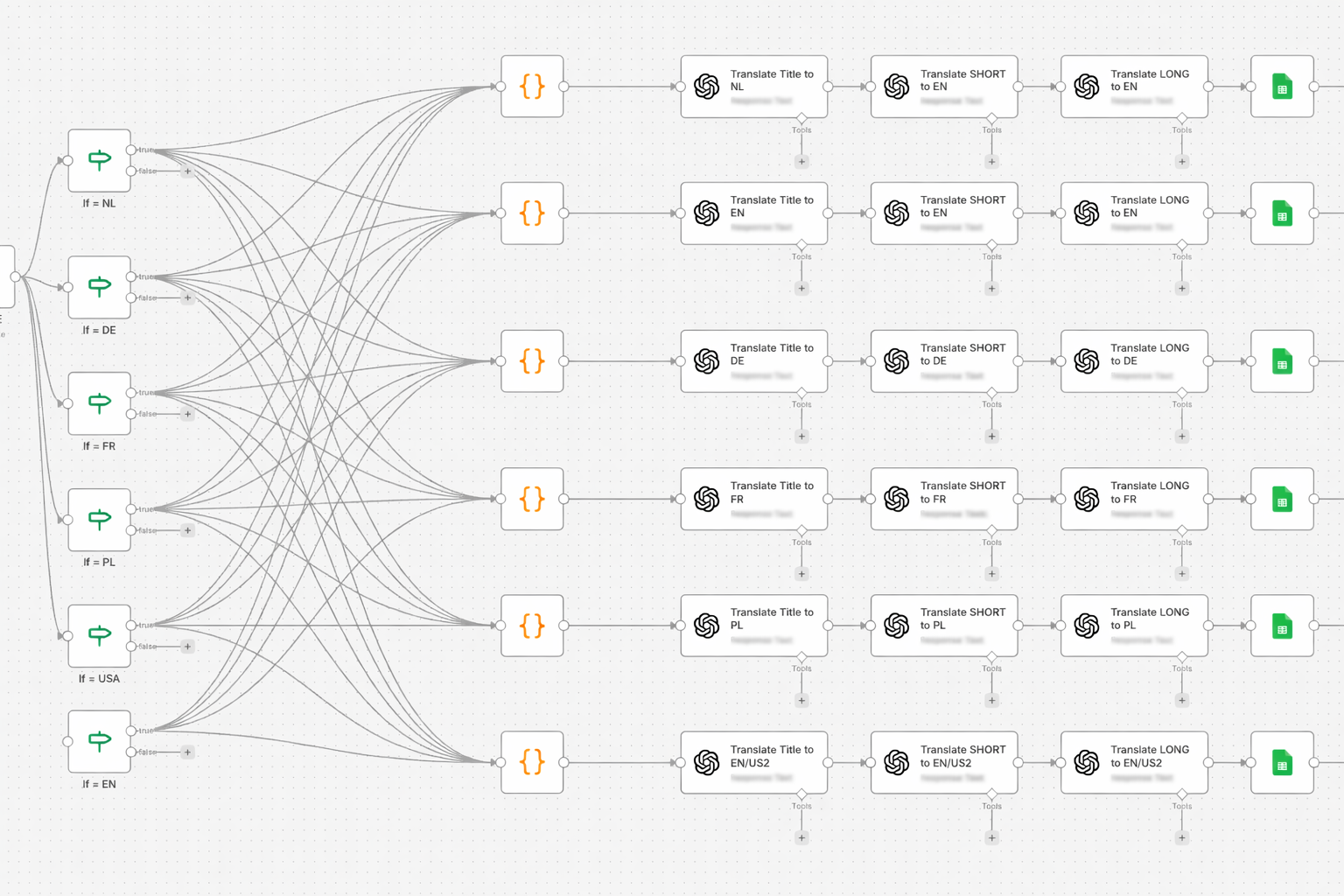
A large ecosystem of integrations
One of n8n’s biggest strengths is the number of integrations it supports. This includes:
- APIs such as OpenAI (GPT), external REST and GraphQL APIs
- Webhooks for incoming and outgoing events
- Data sources like Google Sheets, databases, and CSV files
- Tools and platforms such as email, Slack, Discord, CRMs, and project management tools
When no native integration exists, HTTP Request nodes can be used, making virtually any API-enabled service connectable.
This turns n8n into more than just an automation tool — it becomes a central integration layer between systems.
How I use n8n to automate time-consuming work
I mainly use n8n to automate processes that would otherwise involve many manual steps. These are workflows where you typically need to:
- collect data from multiple sources
- clean or enrich that data
- make decisions based on conditions
- and execute actions across different tools
By automating these processes:
- manual errors disappear
- workflows become reproducible
- tasks that once took minutes or hours require no attention at all
Once a workflow is in place, it runs on its own.
Example use cases
1. Content and AI workflows
Workflows that:
- receive input through a form or webhook
- use AI (such as GPT) to generate, summarize, or rewrite content
- store results in Google Sheets or a database
- automatically forward output to a CMS, email, or notification channel
This makes content production both consistent and scalable.
2. Data processing and synchronization
For example:
- pulling data from multiple APIs
- validating and cleaning that data
- enriching it with additional information
- synchronizing everything into a single source of truth
What would normally require manual copying and checking is now handled automatically and reliably.
3. Monitoring and notifications
n8n can also be used to:
- monitor systems or endpoints
- analyze incoming data
- send notifications only when something actually deviates from normal behavior
This reduces noise and ensures alerts only appear when action is required.
4. Automating internal processes
Such as:
- onboarding workflows
- automatically generated reports
- recurring checks or exports
- notifications triggered by specific events
These processes are ideal for automation because they are predictable and repeatable.
Creativity is the real power
What makes n8n truly powerful is the level of creativity it allows. You’re not limited to simple “if-this-then-that” rules. You can:
- build complex decision logic
- conditionally split and route data
- run multiple paths in parallel
- integrate AI as a decision-making or enrichment layer
By combining AI with automation, workflows don’t just execute — they interpret and respond.
The practical benefits
For me, working with n8n results in:
- Less manual work
- Fewer errors
- Faster processes
- Better scalability
- More focus on work that actually adds value
Instead of spending time on repetition, I invest time in improving the workflows themselves.
Why I self-host n8n
A key part of how I use n8n is self-hosting it. By running n8n on my own infrastructure, I can use the tool completely free of charge — without limits on workflows, executions, or integrations.
Self-hosting also gives me full control over data, performance, and security. There’s no dependency on a third-party platform, no unexpected restrictions, and no usage-based pricing that grows over time.
For automation tools, this is essential. Workflows tend to run frequently and expand over time, and I don’t want quotas or pricing models to dictate what’s possible. Self-hosted n8n gives me that freedom and allows me to scale automations without compromise.
Final thoughts
N8n isn’t a tool that solves a single problem — it’s a platform for building your own solutions. Whether you’re creating simple automations or complex, AI-driven workflows, the possibilities are extensive and continue to grow.
If you want to make processes smarter, more reliable, and less time-consuming, n8n is well worth exploring.